


WhatsitAI: ID & Value Anything
4.5195.00 Reviews
App Specs
- Version
- 2.1.1
- Updated On
- License
- Free
- Downloads
- 50,000+
- Developer
- WhatsitAI Inc
- Categories
- Shopping
- Platform
- Android
Screenshots

 Analysis by AppCompare
I find object-identification apps most useful when they help me make a better next move, not just put a label on something. WhatsitAI: ID & Value Anything is aimed at that moment: I can photograph an unfamiliar item and use the result as a starting point for learning what it might be and what it could be worth. That makes it especially tempting when I’m sorting a thrift-store find, checking a secondhand purchase, or trying to put a name to something I’ve kept in a drawer for years.
It’s a shopping app from WhatsitAI Inc, but the appeal reaches beyond browsing products. I’d treat it as a quick research aid rather than a final authority on identity or price. Its average rating is 4.6 from around 930 ratings, and it has more than 50,000 installs. That suggests a healthy level of interest, though the real test for me is whether it helps answer the specific question I have in front of me.
A practical first pass with a mystery item
The simplest workflow is to start with one object and a clear photo. I’d place the item against a plain background, move it into even light, and frame it so the important details are visible. Then I’d take the identification as a lead to investigate, not as proof. This small change in expectations matters: an image can show shape, color, and visible markings, but it may not reveal material, age, condition, or whether a collectible is genuine.
For a thrift-shop candidate, I’d use the result to decide what to inspect next. If the app suggests a type of object, I can compare its visible design and any markings with what I see in person. I’d also check for damage, missing parts, and wear before treating a value estimate as useful. A quick scan can help me avoid overlooking something interesting, but it cannot replace a closer look at the item itself.
Make each scan easier to judge
Lighting deserves more attention than it might seem to. The original experience can struggle in dim conditions, so I’d avoid relying on a hurried photo in a dark shop or a shadowy corner of the house. Moving near a window or turning on a room light can make edges and surface details easier to capture. If an object has a label or maker’s mark, I’d take a separate close-up rather than expecting one wide shot to show everything.
I’d also keep a simple mental distinction between identification and valuation. Getting the general kind of item right does not automatically mean the suggested value fits the exact piece in my hand. Condition, completeness, materials, and local demand can all change what a buyer might pay. For anything costly or unusually rare, I’d use the app to find useful search terms, then compare the item with reliable specialist references or seek an expert opinion before spending or selling.
Build a repeatable routine instead of scanning at random
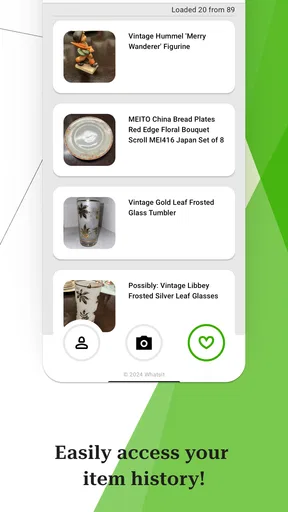
The history tab makes repeated research more practical because I can revisit earlier searches instead of relying on memory. I’d use it as a lightweight notebook: scan an item, note what details still need checking, and return to the result when I have the object or more information in front of me. That can be handy when comparing several pieces at home after a day of browsing.
Worth Reading Before You Choose

Flipboard Shows What News Apps Must Do Beyond the Feed

Switching to Android Auto Means Rethinking Your Driving Routine

Google Calendar Makes a Crowded Week Easier to Manage

Ludo King Makes the Most of the Minutes Between Plans

Baby Panda World Brings Quick Play to Modern Phones, but Its Game Library Feels Busy

ESPN’s Live Game View Makes Following Close Games Easier
One useful habit is to photograph items in the same order: a full view first, then distinctive details such as a stamp, unusual fastening, or visible damage. Even if I’m only using the app’s basic camera workflow, consistent pictures make it easier to compare my own observations across objects. I wouldn’t assume the app stores every detail I need or treats each scan as a formal record; for a collection or resale inventory, I’d keep my own notes and photos somewhere dependable too.
Where it fits among shopping tools
Compared with a general web search, a camera-based identifier can get me from “what is this?” to a plausible name with less guesswork, especially when I don’t know which words to type. Compared with marketplace browsing, it can be a faster first check before I search for similar items. But marketplace listings are not automatically reliable evidence of value either: asking prices can differ from completed sales, and similar-looking objects may not be the same model or condition.
I’d therefore use WhatsitAI as the opening step in a small research chain: identify, inspect, then compare. If I already know the maker and model, a direct search or specialist resale site may be more efficient. If I need a formal appraisal, provenance check, or confident authentication, this app is not the right substitute. Its best role is reducing the blank-page problem when I have an object but no good starting point.
Who will get the most out of it
Curious shoppers, casual collectors, and people sorting household items are the clearest fit. It can help someone decide whether a secondhand object deserves closer attention, or give a beginner vocabulary for researching a hand-me-down. It may also suit a seller who wants an initial clue before writing a listing, as long as they verify the description and set a price using relevant comparisons rather than accepting a single estimate uncritically.
I’d skip it if I needed guaranteed precision, if I was making a high-stakes purchase based only on a scan, or if I already had a specialist source that could identify the item more directly. It is also less appealing for someone who wants a fully manual cataloging system or a dedicated marketplace workflow. The app’s value is speed and curiosity; users who need documentation, authentication, or rigorous price research should bring other tools into the process.
Getting to Know WhatsitAI
Let’s dive straight into what WhatsitAI is all about. The app is your personal detective, designed to identify and provide the value of almost anything you point your camera at. Whether it's a rare plant, a cool vintage item, or that weird bug you found in your backyard, this app claims to know it all.
Setting Up the App
Installation was a breeze. I hopped onto the Play Store (or App Store for my iOS pals), and within a few taps, it was ready to roll. No complicated setup or endless permissions. Just sign in, and you’re good to go.
Features That Stand Out
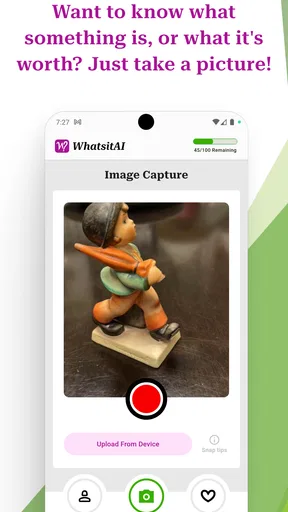
Here’s where WhatsitAI really shines. The interface is clean and intuitive, which is always a plus for someone who hates clutter (like me). The main screen is dominated by a camera viewfinder, inviting you to snap a photo of your mystery object.
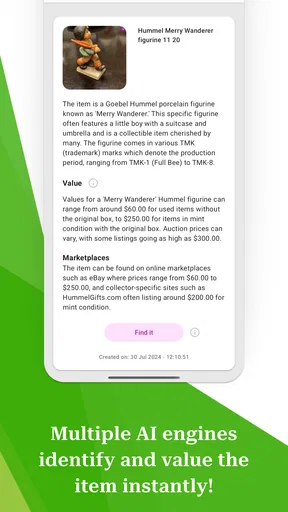
Once you take a picture, the app goes into action. Within seconds, it not only identifies what you’re looking at but also gives you a rundown of its value and some background info. It’s like having a mini encyclopedia in your pocket!
Another handy feature is the history tab. You can revisit past searches, which is perfect if you’re like me and often forget what you learned five minutes ago.
Performance and Accuracy
I was genuinely impressed with how fast and accurate the app was. I tested it on a variety of items around my house – from common houseplants to some obscure antiques – and it nailed most of them. There were a few misses, especially with very unique or uncommon items, but hey, nobody's perfect!
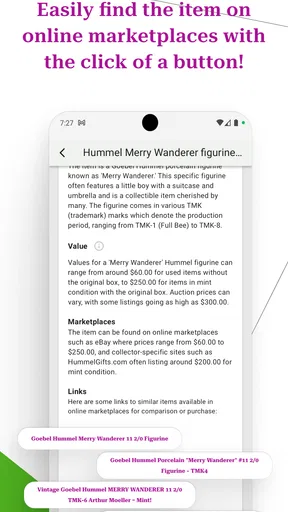
The app also offers links to buy some of the identified items, which is dangerous for my wallet but very convenient if you’re on a shopping spree.
Where It Can Improve
Although WhatsitAI is pretty spectacular, there’s always room for improvement. A few times, the app struggled with low-light conditions. So, for the best results, make sure your lighting is on point.
Also, while it covers a broad range of items, having even more categories would be fantastic. Imagine being able to identify sounds or smells! Okay, maybe I’m dreaming too big, but who knows where technology will take us next?
Worth checking before you rely on a result
The app is free to download, has an Everyone age rating, and its current version is 2.1.1. It requires Android 6.0 or later, while in-app purchases range from $1.99 to $99.99 per item. I’d check the purchase details before committing to anything, particularly if I plan to scan often; a free download does not necessarily mean every possible use is included at no cost.
A realistic everyday use would be finding an unfamiliar serving dish while clearing a cupboard. I’d photograph it in good light, use the result to learn what kind of piece it may be, and check its underside for a maker’s mark. If I were considering selling it, I’d then compare close matches and account for condition. That sequence is more dependable than treating an instant estimate as a guaranteed offer.
My take after putting it in context
WhatsitAI works best when I approach it with a question and a follow-up plan. It can make an unfamiliar object less mysterious, give me a vocabulary for further searching, and keep past discoveries within reach. Its limitations are the same ones that matter with any image-led tool: a poor photo can weaken the result, and a plausible identification is not the same as expert verification or a firm market price.
Final Thoughts
In a nutshell, WhatsitAI: ID & Value Anything is a fun, educational tool that’s worth a spot on your phone. Whether you’re an avid collector, a curious learner, or just someone who loves discovering new things, it’s a great companion. The app isn’t just about identifying objects; it’s about fueling curiosity and learning more about the world around us.
So, if you’ve got a knack for exploration, give WhatsitAI a whirl. It might just become your new favorite app!
Pros
- Easy to navigate user interface.
- Quick identification of multiple items.
- Supports a wide range of categories.
- Offline mode available for convenience.
- Frequent updates with new features.
Cons
- Requires camera access at all times.
- May misidentify rare items.
- Ads in free version can be intrusive.
- Limited language support currently.
- Some features require in-app purchases.
FAQs for WhatsitAI: ID & Value Anything
What is WhatsitAI and what does it do?
WhatsitAI is a powerful identification tool that uses advanced AI to recognize and provide detailed information about various objects, plants, animals, and more. Simply snap a picture or upload an image, and the app will analyze it to offer insights, including possible value or rarity, making it an essential tool for collectors, students, and curious minds.
Is WhatsitAI free to use, or are there in-app purchases?
WhatsitAI offers a free version with basic features, allowing users to identify a limited number of items daily. For extended use and access to premium features like detailed historical data, market value estimations, and rare item alerts, users can opt for in-app purchases or a subscription plan.
How accurate is the identification process of WhatsitAI?
The accuracy of WhatsitAI's identification process is highly reliable, thanks to its advanced machine learning algorithms and extensive database. However, accuracy can vary based on image quality and rarity of the item. The app is continuously updated to improve precision, and users are encouraged to provide feedback if discrepancies occur.
What platforms is WhatsitAI available on?
WhatsitAI is available for both Android and iOS devices. Users can download it from the Google Play Store or Apple App Store. The app is optimized for smartphones and tablets, ensuring a seamless experience across various devices, making it convenient for users on the go.
Does WhatsitAI require an internet connection to function?
Yes, WhatsitAI requires an internet connection to access its vast database and provide accurate identifications. While some basic functions may be available offline, the full capabilities, including detailed analyses and updates, are dependent on a reliable internet connection to ensure the best user experience.


